Percentage Calculator – Calculate Percent Online Quickly and Free
Discounts, interest rates, tax, tips, nutrition labels and test marks all come down to the same few sums. This calculator answers the three questions people ask most: what is X% of a number, what percent is one number of another, and by how much did a value rise or fall. Every formula it uses is spelled out below with a worked example, so you can check a result by hand or rebuild it in a spreadsheet.
How to Use the Percent Calculator
Three questions, three ways to fill the boxes
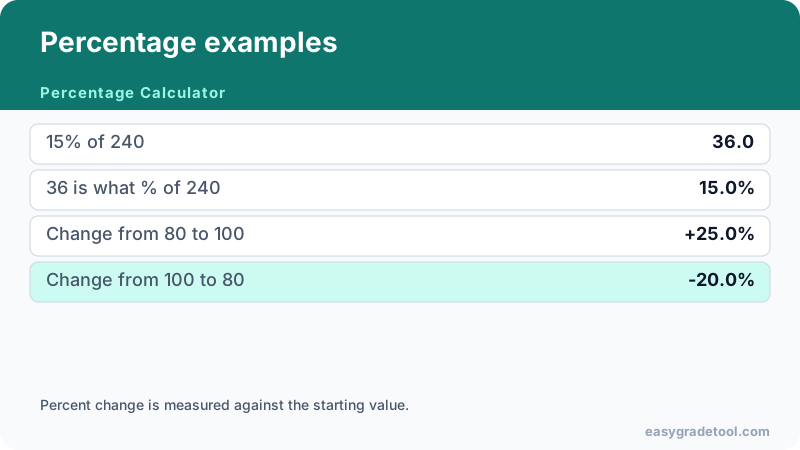
- A share of a number. Enter the base and the rate. 15% of 200 is 200 × 0.15 = 30.
- One number as a percent of another. Divide the part by the whole and multiply by 100. 45 out of 60 is 75%.
- Increase or decrease. Enter the old value and the new one. A price that moves from 80 to 100 is up 25%, because 20 ÷ 80 = 0.25.
What the percent sign means
The symbol % stands for “per hundred”, so 25% is 25 out of every 100, the fraction 1/4 and the decimal 0.25. Moving the decimal point two places to the left turns a percent into a decimal (75% becomes 0.75), and moving it two places to the right turns it back (0.6 becomes 60%). A fraction works the same way after you divide the top by the bottom: 1/8 is 0.125, or 12.5%.
Key Percentage Formulas
Percentage of a number
The part equals the whole times the rate divided by 100. Twenty percent of 150 is 150 × 0.20 = 30. Run it backwards when you know the part and the rate: if 30 is 20% of a total, the total is 30 ÷ 0.20 = 150. That reverse step is how you find an original price from a sale price.
Percentage change and percentage difference
Change = (new − old) ÷ old × 100. Going from 50 to 65 is a 30% increase, since 15 ÷ 50 = 0.30. The same gap read from the other direction, 65 down to 50, is a 23.1% decrease, because the starting point is now larger. That asymmetry is why change always needs a “from” value.
When neither value is the starting point, use the percentage difference instead: |a − b| ÷ ((a + b) ÷ 2) × 100. For 50 and 65 that is 15 ÷ 57.5 = 26.1%. Reach for change when something happened over time, and for difference when you are simply comparing two figures, such as prices from two shops.
Converting between percents, decimals and fractions
Divide by 100 to go from a percent to a decimal, multiply by 100 to go back, and divide the numerator by the denominator to turn a fraction into a decimal first. So 3/5 is 0.6 and 60%, and 0.045 is 4.5%. Spreadsheets store percents as decimals, which is why a cell showing 18% holds 0.18.
Everyday Examples
- Sale price: 25% off 80 leaves 75% to pay, so 80 × 0.75 = 60.
- Tip or tax: 18% on a 45 bill is 45 × 0.18 = 8.10. The tip calculator also splits it between people.
- Test mark: 42 right out of 50 is 84%. The test grade calculator adds the letter and the score needed for the next one up.
- Percentage points: a rate that moves from 4% to 6% has gone up 2 percentage points, which is a 50% relative increase.
- Back-to-back changes: a 20% rise followed by a 20% fall does not return to the start. 100 becomes 120, then 96.
Common Percentage Mistakes
- Dividing by the new value instead of the old one when measuring change.
- Mixing up percentage points with percent, which exaggerates or hides a shift.
- Averaging percentages from groups of different sizes without weighting them. The weighted grade calculator handles that case.
- Rounding in the middle of a calculation rather than at the end.
Related Calculators and Tools
Percentage Difference Calculator
To compare two figures with no obvious starting point, enter both values and read the difference formula above. It suits sales numbers from two periods, prices from two sellers or scores from two classes.
For school, university and the dining table
For marks and scoring, try the Easy Grade Chart, the Weighted Grade Calculator or the CGPA to Percentage Calculator. For restaurant bills, the Tip Calculator turns a gratuity rate into an amount.